Tracking & AnalyticsService
Offline Conversion Tracking — CRM & Payment to Ads Pipelines
Feed real CRM and payment outcomes back into Google Ads and Meta so bidding learns from actual sales, not just form fills or checkout starts.
- Published
- Reviewed
Prefer email? next@taskfordaniel.com
The problem
Why don't ad platforms see your real sales?
Ad platforms are good at seeing what happens on your website and bad at seeing what happens after — a lead that a sales team later disqualifies, a subscription that churns in month one, a phone sale that never touched a web form at all.
If the only signal Google Ads or Meta ever gets is “someone filled out a form” or “someone started checkout,” that’s what bidding optimizes toward, whether or not those events actually turned into revenue.
For lead-generation businesses and anyone with a sales process that continues off-platform, this creates a real gap: the ad account is optimizing against a proxy for success, not success itself.
Scope
What I do
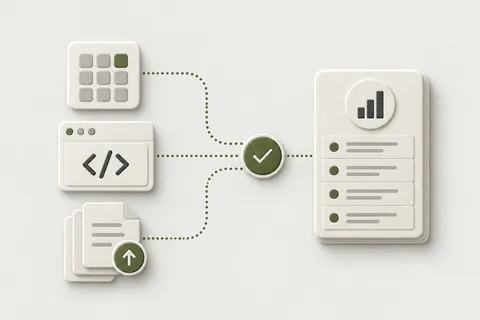
I build the pipeline that connects your actual outcomes — CRM-qualified leads, closed sales, captured payments — back to the ad platform that drove them:
-
Event mappingdefining, with you, what actually counts as a valuable conversion for bidding purposes. Not every form fill is worth the same, and the pipeline should reflect that.
-
Pipeline constructiontypically a webhook from your CRM or payment processor (Stripe is a common example) that triggers a scheduled import into Google Ads’ offline conversion tool, or an equivalent path for Meta.
-
Click-ID hygienemaking sure a gclid or equivalent identifier is captured at the point of lead entry and stored through to wherever the outcome is eventually confirmed, since without it there’s nothing to match the sale back to.
-
Feedback loop designstructuring the import so bidding algorithms actually learn from lead quality over time, rather than treating every top-of-funnel event as equally valuable.
The process
How it runs
-
Mapping the sales process
I walk through what actually happens after a lead or checkout event — where it lives (CRM, payment processor, spreadsheet), how long it takes to resolve, and what “qualified” or “closed-won” means for your business.
-
Click-ID capture
I confirm the click identifier is being captured at first contact and verify it survives through to wherever the outcome gets recorded — this is where most offline conversion setups quietly fail.
-
Pipeline build
The webhook or scheduled-import job is built and connected — for example, a payment webhook triggering a periodic offline conversion upload to Google Ads.
-
Verification
Imported conversions are checked inside the ad platform to confirm they’re being recognized and matched correctly, not just sent.
-
Handoff
You get documentation of the full pipeline — what triggers it, what it sends, and how to adjust the mapping if your definition of a qualified conversion changes.
Handover
What you get
A working, verified pipeline from your CRM or payment system into the ad platform’s offline conversion import, click-ID hygiene fixed at the point it usually breaks, and documentation of the whole flow. Where relevant, this includes a lead-quality feedback structure so bidding has more than a form-fill to learn from.
Handover kit
- CRM/payment event mapping — defining what actually counts as a qualified conversion
- Webhook or scheduled-import pipeline (for example, a payment webhook feeding a scheduled Google Ads offline conversion import)
- Click-ID (gclid or equivalent) capture and storage at the point of lead or payment entry
- Lead-quality feedback loop design, so bidding can learn from real outcomes, not just top-of-funnel events
- Verification of imported conversions inside the ad platform
- Documentation and handoff of the full pipeline
Price and timeline
Next step
Describe your sales process and where outcomes are recorded. Discussing it is free, and I’ll say what I’d need to see to quote it. If you run a Shopify store and the question is why ad platforms and orders disagree, the Tracking Health Check is an option.
Email next@taskfordaniel.com with that description. This pairs closely with Google Ads conversion tracking work when gclid hygiene needs fixing at the source, and with server-side tracking when the pipeline needs to run through a server layer you control.
QuoteFixed before work starts
- Price
- Focused Fix from USD 450 · Custom Engineering Project from USD 1,500 · quoted in writing
- Turnaround
- Quoted directly for a defined task, or scoped from the Health Check; typical pipeline builds run 1–2 weeks including verification

A note from Daniilbefore you decide
What this is not
This doesn’t build your CRM or sales process — it connects to whatever you already have. It also isn’t a guarantee that bidding algorithms will immediately optimize better; feeding accurate offline data in is necessary for that to happen, but the algorithm still needs enough volume and time to learn from it.
And if your sales cycle involves manual, inconsistent qualification (a lead marked “won” by one rep and “maybe” by another), the pipeline is only as reliable as the data it’s fed — that’s a process problem the pipeline can surface but can’t fix on its own.
— Daniil
Questions
FAQ
What counts as an 'offline' conversion, exactly?
Anything that confirms a real, valuable outcome outside the ad platform itself — a closed sale from a CRM, a phone booking, a payment captured through a processor like Stripe, a lead that a sales team later qualifies or disqualifies. The ad platform only sees a form fill or a checkout start unless you tell it what happened next.
Have you built this kind of pipeline before?
Yes — I've built CRM and payment-to-ads pipelines for a lead-generation client, feeding qualified outcomes back into Google Ads so bidding could learn which leads actually converted to sales, not just which ones filled out a form. I won't share client specifics or numbers here, but it's delivered work, not a theoretical scope.
Does this require developer resources on my side?
Usually minimal — most of the pipeline lives in the webhook/integration layer (Stripe, your CRM's API, a scheduled import job) rather than in your website's frontend code. Where your CRM or payment processor needs a webhook endpoint configured, I'll tell you exactly what's needed and can often set it up directly if I have the right access.
How does the ad platform know which click led to which offline sale?
Through a click identifier — a gclid for Google Ads, or an equivalent — captured at the point of lead or checkout entry and carried through your CRM or payment record until the outcome is known. If that ID isn't captured and stored correctly at the start, there's nothing to match the later conversion back to, which is the most common reason offline conversion imports fail silently.
What if my sales cycle is long — weeks or months between the lead and the sale?
That's exactly the case this is built for. Standard on-site conversion tracking can't see a sale that happens six weeks later in a CRM. A scheduled import job re-matches those outcomes back to the original click on whatever cadence makes sense for your sales cycle, so the ad platform eventually learns from the real result, not just the form fill.
Where to go next
- Solution Google Ads Conversions Not Matching GA4: Why
- Article Server-Side Tracking: Benefits, Limits and Architecture
- Article Offline Conversions to Google Ads After June 15: Scheduled Imports vs the Data Manager API
- Knowledge Base What Are Click IDs: gclid, gbraid, wbraid, fbclid and oppref?
- Knowledge Base What Is Offline Conversion Import in Google Ads?
- Case study Google Ads Was Optimising for Free Screenings. Now It Knows Who Paid.

What do you need to get working?
Describe your taskThe first answer is free, within one working day. Or write directly: next@taskfordaniel.com