Tracking & Analytics · Shopify
Shopify conversion tracking: rescue, rebuild, and proof
Shopify controls the code where your purchase fires — and it keeps changing it. I rescue the tracking when it breaks, rebuild it on Customer Events and server-side, and prove it against your real orders. GA4, Meta CAPI, Google Ads, and consent, reconciled end to end. Describing the problem is free.
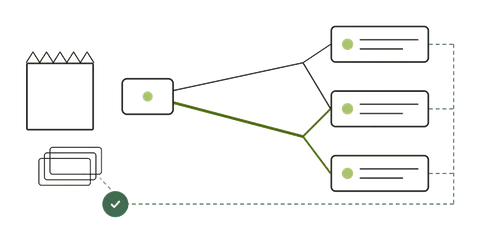
Follow the order. Then compare the evidence.
- Real orderOrder ID, amount, currency
- Browser / server eventsConsent, event ID, delivery
- GA4 / advertising platformsReceived events and reporting
- Reconcile the recordsMatch IDs, time windows and definitions
Who I work with
Who this is for
Who I am not for
Not a fit — and that is fine
- Media buying or promised ROAS: I fix measurement, not campaigns.
- Prettier dashboards on top of broken data.
If a quick install is all you need, the guides below may be enough, and that’s a good outcome too.
Why Shopify tracking breaks
The Shopify-specific failure modes
Most of these are not bugs in your setup — they are consequences of how Shopify’s checkout works today. Each one needs a different fix. Shopify’s own documentation on checkout extensibility, the Web Pixels API, and the order status page carries the authoritative, current timeline.
Scope and cost
What it costs
Describing the task is free, by message or a call of up to 15 minutes. If the cause is unknown, a Health Check can establish it; if the fix is already clear, I quote it directly.
Ongoing tracking work? Technical Partnership, USD 1,000/month →
Every tracking fix ends with a test order and an order-level reconciliation; defects in the delivered scope are fixed free for 30 days.
Estimate
- Not sure yet? Discuss the task Free A short exchange by email or a 15-minute call: whether it fits and which option applies.
- Not sure what’s broken? Tracking Health Check USD 395 Read-only, written conclusion two working days after the kickoff, with a fixed quote where the fix has a definable scope.
- Already know the fix? Focused Fix from USD 450 One bounded repair, fixed quote before work starts.
- Bigger rebuild or migration? Custom Engineering Project from USD 1,500
Send me your store URL and one sentence about what looks wrong. You will get an honest read: what is likely broken, whether it is worth fixing, and what step one costs.
Proof
Every tracking fix ends with a reconciliation
I do not hand over a report that says “fixed.” The evidence pack lines every platform up against your actual Shopify orders, so the result is provable rather than asserted.
-
Order-level reconciliation
One row per source — GA4, Meta CAPI, Google Ads — with order count and revenue against Shopify as ground truth, and the delta per row.
-
Deduplication verification
Proof that the browser and server events for one purchase share a single event_id and are counted once, checked in Events Manager.
-
Before / after event matrix
Which events fired, on which platform and which checkout path, before the work versus after — legible to your whole team.
Diagnose the exact symptom
Each guide starts with what you can see, gives a direct answer, then walks the real diagnostic — where to click and what the signal means.
- GA4 Not Tracking Purchases on Shopify: Diagnosis
- GA4 Purchase Event Fires Twice on Shopify: Diagnosis
- GA4 Revenue Doesn't Match Shopify: Full Diagnosis
- GA4 Unassigned Traffic on Shopify: Diagnosis
- Google Ads Conversions Doubled After a Tracking Change: Diagnosis
- Google Ads Conversions Not Matching GA4: Why
- Meta CAPI Not Deduplicating: Fix Duplicate Events
- Meta Reports More Purchases Than Shopify: Diagnosis
- Shopify Checkout Tracking Broken: Diagnosis
Go deeper
- Article Fix the GA4 Purchase Event on Shopify (Step by Step)
- Article Meta CAPI Deduplication: How event_id Actually Works
- Article Shopify Tracking Audit Checklist: What Each Check Proves
- Article GA4 on Shopify: the Google & YouTube App vs a Custom Web Pixel
- Article Google Ads Conversion Tracking on Shopify: the Google & YouTube App vs a GTM Conversion Tag vs Offline Conversion Import
- Article Server-Side Tracking: Benefits, Limits and Architecture
Key terms
Questions
Shopify tracking FAQ
Do you need access to my store to start?
No. To start, send your store URL and one sentence about what looks wrong. Read-only access is needed only if you book a Health Check or a fix.
Will this disrupt my live Shopify checkout?
No. Customer Events pixels and server changes are built in a separate workspace, previewed, and validated on a real test order before publishing. Every change has a rollback path, and the old path is switched off only once the new one is proven.
My purchase tag was in Additional Scripts. Is that why it stopped?
It could be. Shopify sunset Additional Scripts on Thank you and Order status pages in August 2025, and customizations left there can be lost when the store upgrades those pages. I check the store’s checkout upgrade report and a test order before attributing a GA4 revenue drop to that tag, then move the tracking to a supported Customer Events pixel if needed.
Do you work with Stape, server-side GTM, or your own platform?
All three. Stape or self-hosted server-side GTM for most brands; my own platform, Fixel Pixel, when volume, cost or data control call for it. I compare them on fit, support and total cost of running and recommend what fits your store — I own Fixel Pixel and say so; nothing obliges you to install it.
What if the Health Check finds nothing wrong?
Then I tell you that, in writing, and you have bought certainty before scaling spend — which is worth more than a fix you did not need.

Prove your Shopify data before you scale.
Describe your taskThe first answer is free, within one working day. Or write directly: next@taskfordaniel.com